
The food and restaurant industry thrives on speed, accuracy, and flawless coordination. From fast-paced quick-service restaurants (QSRs) to fine dining establishments, the pressure is constant — deliver the right order, at the right time, with zero mistakes.
But many restaurants still rely on manual order slips, printed KOTs (Kitchen Order Tickets), or outdated third-party kitchen screens. These fragmented tools slow down operations, create miscommunication between the waitstaff and kitchen, and increase preparation errors.
This is where Odoo’s new and improved Kitchen Display System (KDS) transforms the entire workflow.
Odoo’s latest version brings a fully integrated, modern, and highly customizable Kitchen Display module — designed for speed, clarity, and perfect coordination between the POS and kitchen.
Let’s explore how this new module redefines restaurant operations and why upgrading from old versions or third-party systems is a smart business move.
Why Restaurants Need an Integrated Kitchen Display System
From dine-in orders to online delivery requests — every second counts. Even the smallest delay or miscommunication can cause:
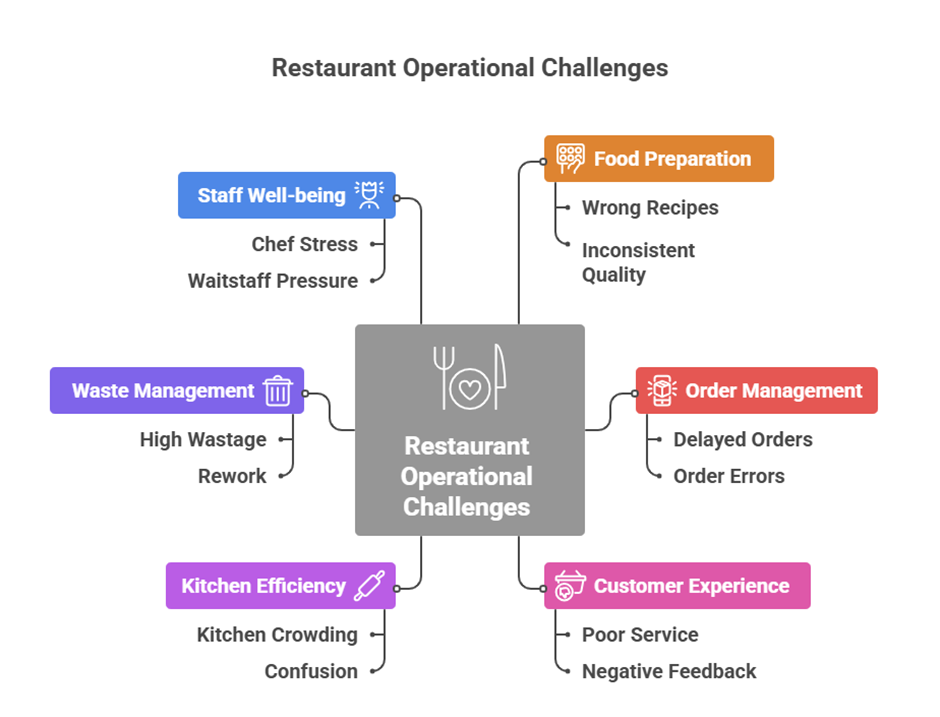
Traditional systems-paper KOTs, manual notes, or basic touchscreen displays — fail to handle the speed and complexity of modern restaurants.
Restaurants today need a unified, real-time, smart preparation system that connects ordering, cooking, and serving seamlessly.
Odoo’s KDS offers exactly that and much more.
Old Odoo Kitchen Display vs New Version - What Changed?
In older versions of Odoo, there was no fully integrated built-in kitchen display. Businesses relied heavily on third-party modules that offered basic KOT displays but came with limitations:
- Limitations of Old Versions / Third-Party Modules
- No built-in custom layout designer
- No drag-and-drop table management
- No advanced stage management or alerts
- Limited customization and poor UI
- Sync issues between POS and kitchen
- No customer-ready display
- Inconsistent support or feature updates
These modules worked, but they lacked the smooth experience and deep POS integration required by restaurants today.
The New Odoo Kitchen Display: A Game Changer
With Odoo 17+ and the latest Odoo releases, the Kitchen Display is now a native, highly enhanced module built directly into the POS ecosystem.
Key Improvements in the New Version
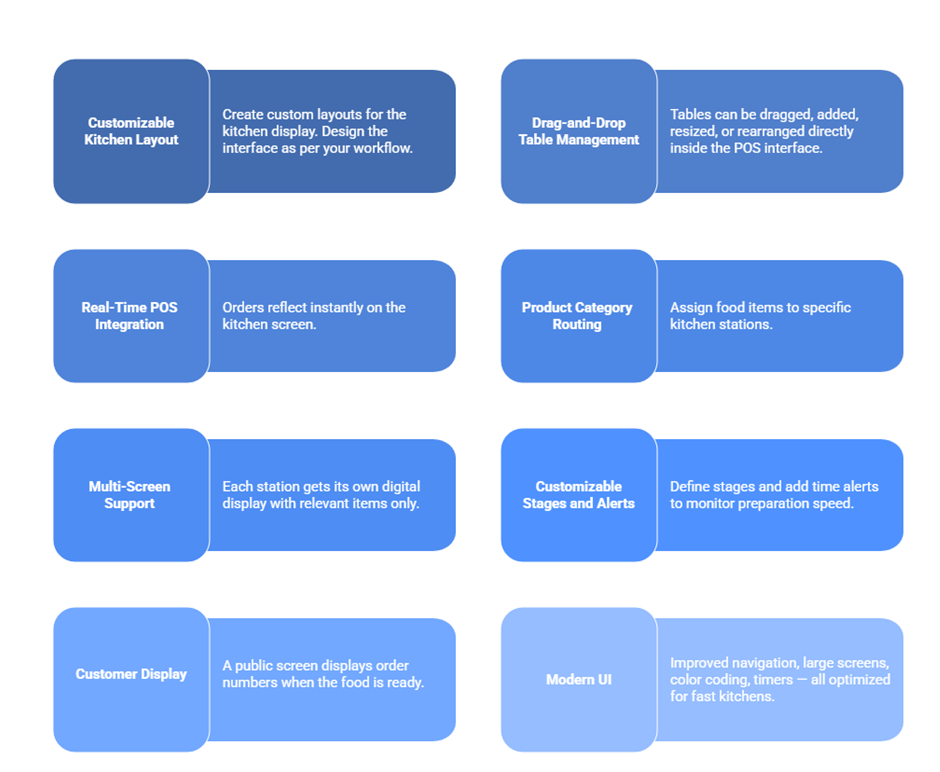
How Odoo’s New KDS Works in Real Time
Here’s how the complete workflow looks in the latest version:
1. Order Placement
Waiter selects the table (drag-and-drop layout).
Enters order on POS.
Items instantly route to the respective kitchen display.
2. Kitchen Processing
The chef views all items on the KDS.
Each item can be marked as cooking, ready, or completed.
Alerts notify the staff if items cross expected preparation time.
3. Front-of-House Coordination
Waitstaff sees real-time status of every dish.
No need for repeated kitchen follow-up.
4. Customer Notification
Once an item is marked ready, it appears on the Customer Display Screen.
Customers instantly know when to pick up their food.
5. Order Completion
When all items are ready, the order is closed.
The POS updates automatically.
This creates a smooth, transparent, and efficient experience for customers, staff, and kitchen teams.
Key Features of Odoo KDS for Restaurant Excellence
Odoo’s new Kitchen Display module covers every operational requirement modern restaurants demand.
1. Multi-Location Restaurant Support
Manage multiple branches and multiple kitchens effortlessly.
2. Unlimited Screens and Stations
Set up:
- Tandoor station
- Bar station
- Salad counter
- Grill section
- Dessert corner
Each screen gets only what they need.
3. Automatic Order Prioritization
Older orders appear first, ensuring timely service.
4. Item Notes & Custom Instructions
Special requests like "extra cheese" or "no onion" reflect clearly.
5. Real-Time Sync Across All Devices
Use tablets, large kitchen monitors, POS terminals — all connected.
6. Advanced Reporting & Analytics
Track:
- Preparation time
- Peak hours
- Item performance
- Order delays
7. No Dependence on Printers
Save money, reduce errors, go fully paperless with digital KOTs.
New Version vs Old Version - Why Upgrade
Feature | Old Versions / Third-Party | New Odoo Version |
|
Custom Layouts |
Not available |
Fully customizable layouts |
|
Drag-and-Drop Tables |
No |
Yes |
|
Native Odoo Integration |
Limited |
100% integrated |
|
Multi-Station Routing |
Basic |
Advanced |
|
Customer Display |
Mostly unavailable |
Fully integrated |
|
Stage Management |
Limited |
Multi-stage workflow |
|
Timers & Alerts |
No |
Exists |
|
UI/UX |
Outdated |
Modern, fast, touch-friendly |
The difference is massive, the new version is built for speed, scalability, and complete restaurant control.
Benefits of Using Odoo Kitchen Display
Odoo’s new KDS brings tangible improvements to day-to-day restaurant operations:
1. Faster Order Preparation
Instant updates eliminate delays and misunderstandings.
2. Zero Miscommunication
Digital routing ensures every item reaches the correct station.
3. Reduced Wastage
Orders are trackable from preparation to delivery.
4. Better Customer Experience
Faster service, fewer mistakes, accurate preparation.
5. Higher Staff Productivity
Waiters stop running back to the kitchen — they get real-time updates.
6. Smart Restaurant Layout
Drag-and-drop POS tables make managing the floor effortless.
7. Better Decision-Making
Restaurant owners get valuable insights on preparation performance.
Industry Use Cases: Who Benefits from Odoo KDS
Odoo’s Kitchen Display is ideal for:
Quick Service Restaurants (QSRs)
Handle large volumes and fast rotation.
Fine Dining Restaurants
Improve coordination between bar, kitchen, and service.
Multi-Cuisine Restaurants
Route dishes to appropriate stations automatically.
Cafes, Bakeries & Dessert Shops
Track and prioritize preparation tasks.
Food Courts & Cloud Kitchens
Perfect for high-volume, multi-brand operations.
Why Choose Namah Softech for Your Odoo Implementation
Namah Softech Pvt. Ltd., a certified Odoo Silver Partner, has deep expertise in POS and restaurant automation.
We ensure:
- Smooth setup of kitchen display systems
- Custom workflows tailored to your restaurant
- Clean data migration
- POS hardware compatibility
- End-to-end training for kitchen and staff
- 24/7 continuous system support
- Enhancements like custom layouts, auto-routing, multi-brand POS setups
Whether you're upgrading from old systems or implementing Odoo for the first time — we ensure your restaurant operations become smarter, faster, and error-free.
Upgrade Your Restaurant with Odoo’s Smart Kitchen Display
Modern restaurants demand precision, speed, and real-time communication.
With Odoo’s latest Kitchen Display System, you get:
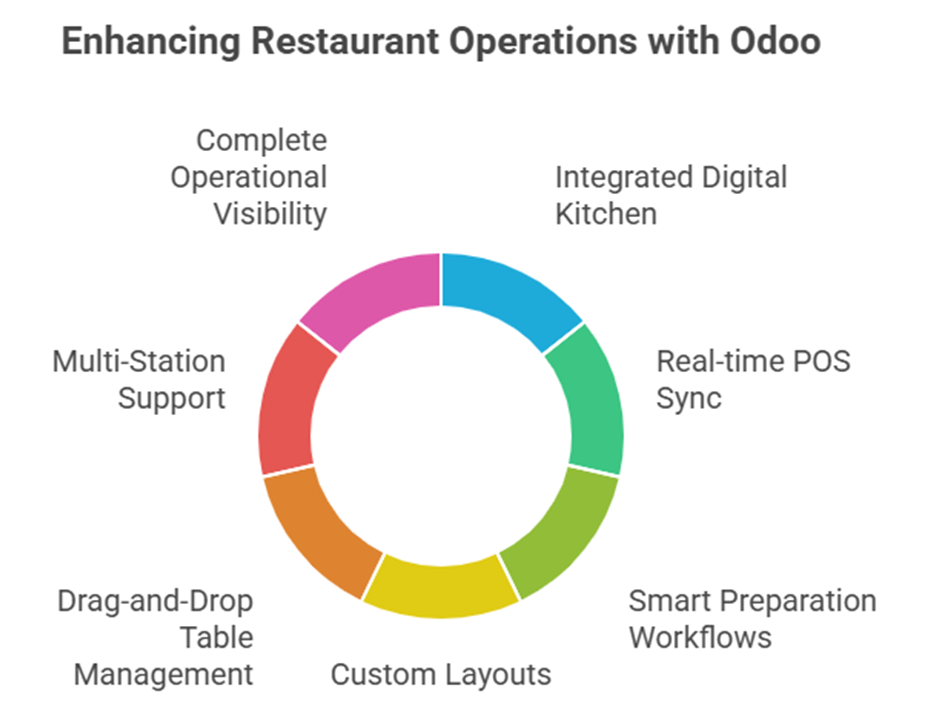
Odoo is more than a KDS — it’s a future-ready platform for restaurants aiming to deliver exceptional service and scale operations.
With Namah Softech as your implementation partner, your kitchen becomes smarter, your service becomes faster, and your customers leave happier.
Transform your restaurant with Odoo — the future of kitchen operations is here.